The latest update, now available on the JISC Learning Analytics platform includes a new report where you can view an individual student’s attendance record. This report includes details on each of the sessions, filtering by date range, session type, unit and shows an attendance rate which refreshes based on the filtering that you have set. This means you can view an attendance rate for all of a student’s sessions, sessions within a specific date range, for specific units only or types of sessions like Lectures. We hope this report will be particularly useful where you need to view a student’s attendance within the set 3 week engagement window for the Academic Engagement Framework.
The report is available from the Student Overview page which can be accessed by clicking a student’s name from any of the screens in JISC LA. The easiest way to get there is by going to JISC LA, click Students in the left hand menu, search for the student you wish to view and then click their name. 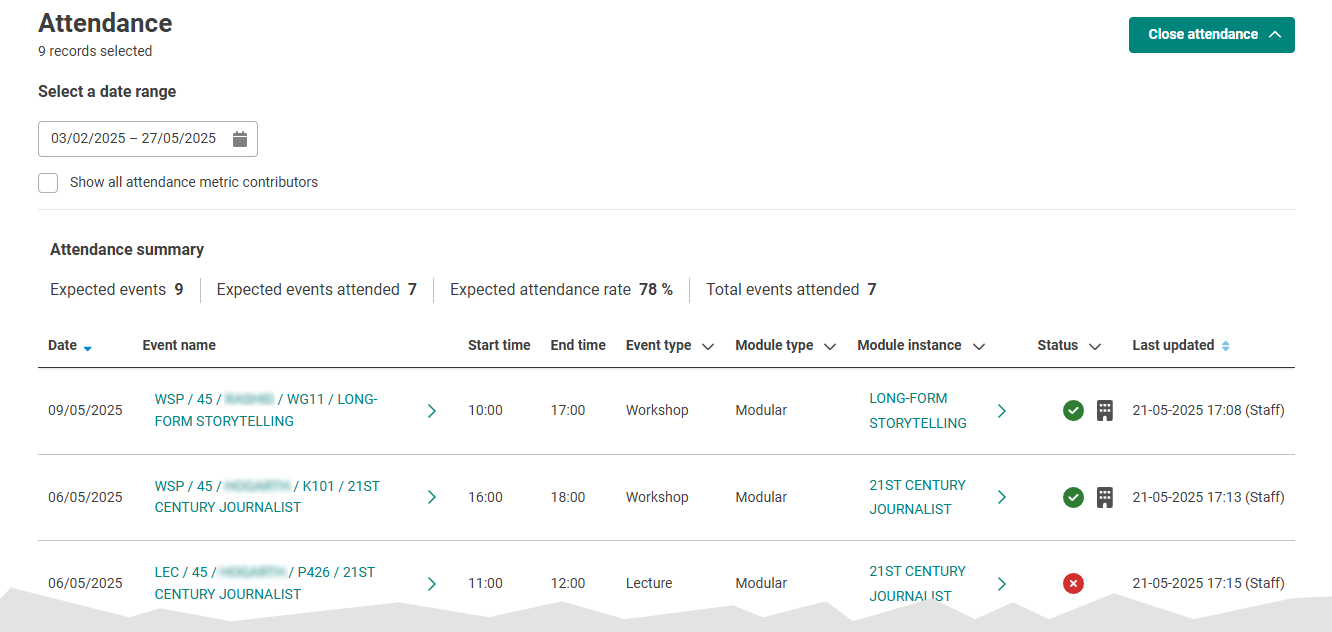
Further guidance and support
For further information on accessing and using this report, visit our How to view attendance for an individual student guide. All of our guidance for using JISC LA is available from our JISC Learning Analytics page within the Brightspace Staff Resources area.
If you have further questions then contact your Faculty Learning Technologist:
- HSS: hsslearningtechnology@bournemouth.ac.uk
- BUBS: bubslearningtechnology@bournemouth.ac.uk
- FMC: fmclearningtechnology@bournemouth.ac.uk
- FST: scitechlearningtechnology@bournemouth.ac.uk
For more information on the way in which we review and follow up on students’ academic engagement at BU, visit the Academic Engagement Framework Sharepoint site.


